MY ROLE
Design lead. End-to-end ownership across a two-sided platform; from the first onboarding screen to the hiring manager's dashboard. Five acquisition flows, one design system, a team of two designers and one CMS developer.
ROLE
Product Experience Designer
TIMELINE
January 2025 - Current
TOOLS
Figma, Lovable
& Claude
Overview
The resume was never built to capture what a clinician can do. It was built to get past a filter. And for years, that's been the deal — rewrite the same experience in slightly different words, hope the right keywords land, and wait. On the other side, hiring managers are staring at stacks of those same resumes, looking for signal in a format that was never designed to carry it. Two sides. Same broken system. Pivotor is built for both.
TEAM
1 Designer, 1 CMS Developer, 3 Engineers and 1 AI Marketing Engineer
PIVOTOR AI
Two-sided. AI-native. Built for healthcare.
B2B SaaS · AI · Career Tech · Healthcare

The Clinicians
Every other platform reads the resume and makes a judgment. Years of real work, real skill, real impact. A system that keeps filtering on the wrong things. They're not looking for a career overhaul. They're looking for a faster way to what they already know they're capable of. Most platforms weren't built for them. Pivotor is the first one that actually listens before it decides anything.
The Hiring Manager
Not bad at hiring. Buried in it. Hundreds of resumes, most saying the same thing, none showing what actually matters. Hours spent on first calls that confirm the wrong fit too late, and the right candidate already filtered out before anyone saw them. Pivotor screens before they ever have to show up. The first conversation a hiring manager has is already the one worth having. It clears the noise so the decisions that matter, the ones only a hiring manager can make, get made faster and with more confidence.
THE USERS
THE FLOWS
FLOW 1
The onboarding isn't collecting data; it's building context. Each screen knows what came before it, and uses it. By the time a clinician hits record, the platform already knows their role, their setting, how they're feeling about the move, and what's held them back. The ask doesn't feel out of nowhere. It feels obvious.
Every screen pairs structured options with a prompt bar. Not a text field, not a dropdown. A conversation. Clinicians who don't fit in a box, and most don't, can describe exactly where they are in their own words.
FLOW 2
The return visit isn't a reminder to come back. It's the product proving it was worth coming back to. New job matches, screening requests, profile updates, all waiting. The Briefing surfaces it without overwhelming. The session picks up where the last one left off. And when it ends, you see exactly what was heard, what was extracted, and what the platform will do with it.
FLOW 3
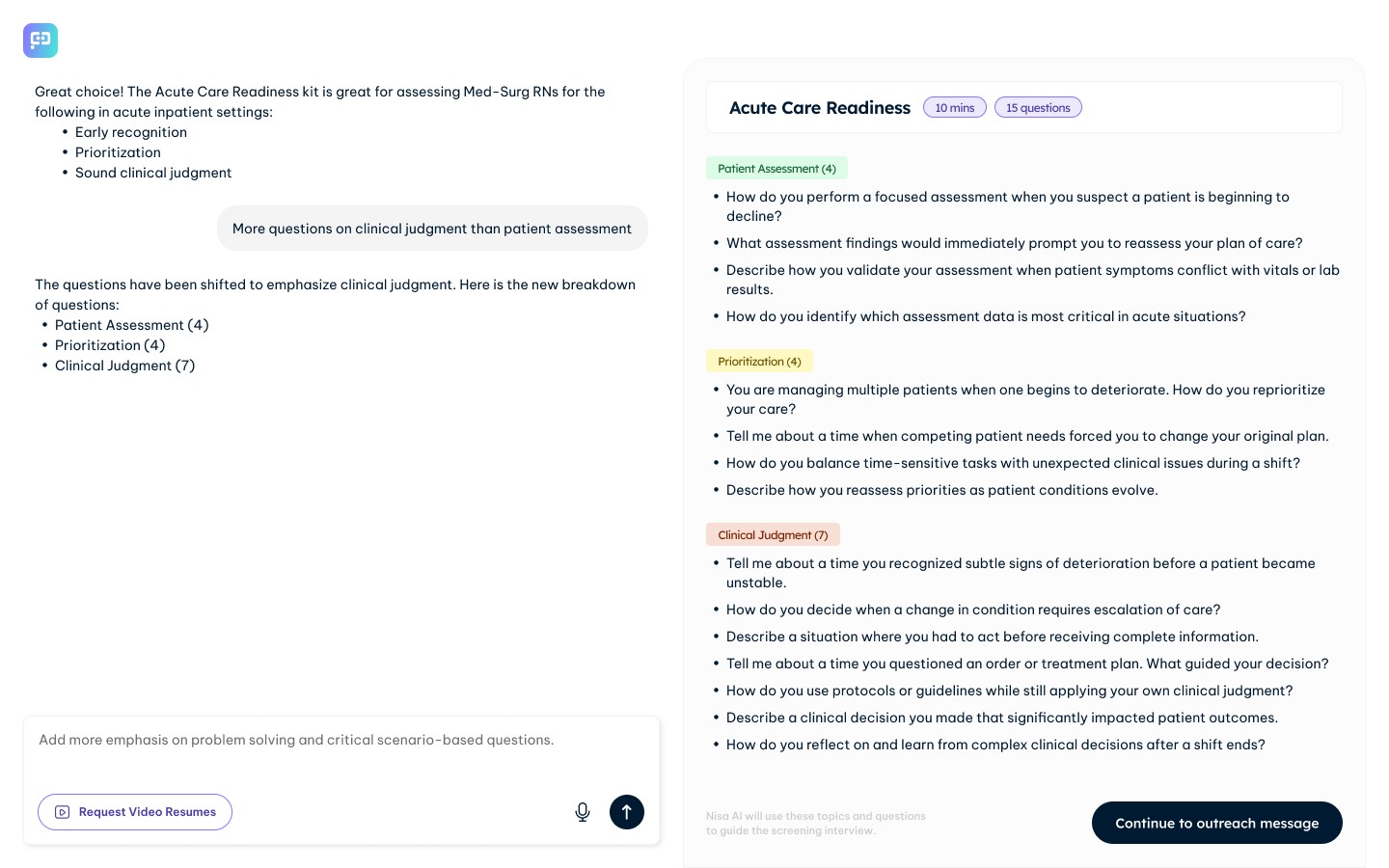
Most hiring tools put the work on the hiring manager. Pivotor removes the grunt work without removing the control. By the time a hiring manager lands on the platform, matched profiles are already waiting. The AI drafts the interview kit and the outreach message, but the hiring manager steers every step. Reviews, edits, approves. The decisions stay theirs. The platform just means those decisions take minutes, not days.
DESIGN CHALLENGE
Clinicians came in with real, layered pain points and the instinct was to solve for all of them.
User interviews gave us a lot. Maybe too much. The harder work was figuring out what to actually focus on. These are people already running on empty, long shifts, high stakes, little room for one more thing to figure out. They didn't need another platform. They needed one that finally got it right.
Career pivoting felt obvious, but a lot of clinicians don't come in knowing where they want to go. That's what made adjacency the anchor. Not "here's your next role" but "here's what's possible given what you already know."
They're looking for signal in a format that was never designed to carry it. Six keywords deciding someone's shot. A capability that never made it onto a page. We wanted to change what they were even looking at, not just make the process faster, but make it actually mean something.
On the hiring side, the problem was just as human. A hiring manager staring at a stack of resumes isn't lazy.
The second challenge cut across both sides. Neither user is looking to learn a new platform on top of everything else they're carrying. Every screen had to feel intuitive enough that the product got out of the way and let the conversation happen. That's harder to design than it sounds.
WHAT SUCCESS LOOKS LIKE
We don't have launch data yet. But the targets we designed toward say a lot about what we were optimising for.
An 80% session completion rate doesn't happen by accident. It means the experience never gave someone a reason to stop. No moment of confusion, no wall of friction, no screen that made them feel like they were doing something wrong. Every design decision in the onboarding, the recording setup, the consent gate; it was all in service of that number.
A session report delivered to a hiring manager within 48 hours means the hiring side had to be simple enough to move fast. No lengthy setup, no back and forth. The platform does the heavy lifting so the human doesn't have to wait to make a decision. A session cost of under $0.20 means this works at scale. Every clinician who applies gets a real shot, not just the shortlisted few. And an AI confidence score that aligns with a human reviewer 80% of the time means the output is actually trustworthy. Not just fast.
© Rhea Pillai. All rights reserved.
Welcome — Set the tone before asking anything. Conversational, not clinical.
Emotional check-in — Understand where they actually are, not just what they want.
Adjacency suggestions — Show what's possible using what they already told you.
Resume reflection — Ask the question that makes the Video Resume feel necessary.
Pre-recording — Remove every reason not to start.
Your Briefing — Every update since you left, ordered by what matters. Audio available so you don't have to read it. Each item links directly to where the action is.
Surface zero state — The starting point between sessions. Alive, not empty.
Live session — Nisa adapts to what's being said in real time. Not a script, a conversation.
Post-session summary — The hardest screen to get right. What you covered, what was extracted, what happens next. Took several rounds to figure out what a person actually needs to see the moment they finish talking.
Split pane — curated profiles — Candidates matched before the hiring manager asked. Capability narratives, not resumes.
Interview kit — Questions built from the JD, surfaced by AI. The hiring manager shapes what stays.
Outreach message — AI drafts it, the hiring manager owns it. Sent when it feels right.
Billing gate — Card added before sending. No charge yet, but the relationship is real now.
Job posting — The last ask. Post the role, keep the pool growing.